Dental Website Speed: Core Web Vitals Thresholds, Common Culprits and a Fix Checklist
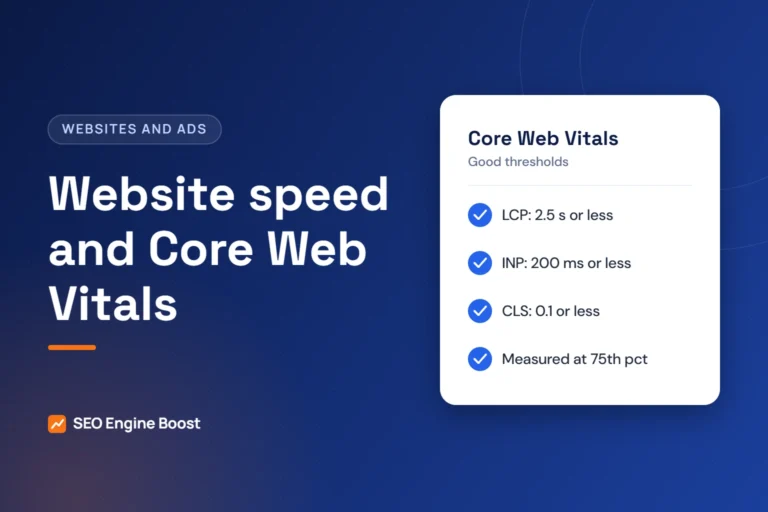
Dental website speed is judged by Google through three Core Web Vitals: Largest Contentful Paint (LCP) should be 2.5 seconds or less, Interaction to Next Paint (INP) 200 milliseconds or less, and Cumulative Layout Shift (CLS) 0.1 or less, measured on real visitors. On practice websites, the usual offenders are hero sliders, autoplay video, chat widgets, booking embeds and too many tracking scripts. This guide shows how to test, what to fix first and what to ask your web vendor.
Key takeaways
- Use field data (real visitors) to judge your site. Lab scores are for diagnosing, not grading.
- INP replaced First Input Delay (FID) as a Core Web Vital in March 2024, so slow chat and booking scripts now show up directly.
- Most practice sites fail on mobile, not desktop. Test the homepage and your top service pages on a phone.
- Fix the hero area first: one optimized image beats a slider or background video almost every time.
- Speed supports SEO, but its biggest payoff is patients who stay long enough to call.
What are the Core Web Vitals thresholds for a dental website?
Google publishes the same thresholds for every site. Search Console’s Core Web Vitals report groups your URLs using these bands, based on the last 28 days of real-user data from the Chrome UX Report:
| Metric | What it measures | Good | Needs improvement | Poor |
|---|---|---|---|---|
| LCP (Largest Contentful Paint) | How fast the main content (usually the hero image or headline) appears | 2.5 s or less | Up to 4 s | Over 4 s |
| INP (Interaction to Next Paint) | How fast the page responds when someone taps a button, menu or form | 200 ms or less | Up to 500 ms | Over 500 ms |
| CLS (Cumulative Layout Shift) | How much the layout jumps while loading | 0.1 or less | Up to 0.25 | Over 0.25 |
Google evaluates these at the 75th percentile of visits, split by mobile and desktop. That means three out of four real visits need to hit the “good” mark, not just your own fast office Wi-Fi.
INP replaced FID in March 2024
Older articles still talk about First Input Delay. On March 12, 2024, INP officially became a Core Web Vital and replaced FID, as Google’s Chrome team announced on web.dev. FID only measured the delay before the first interaction. INP looks at responsiveness across the whole visit. For dental sites, that matters because the most important interactions (tapping “Book now”, opening the menu, typing in a form) are exactly where heavy scripts cause lag.
Does website speed affect dental SEO rankings?
Page experience, including Core Web Vitals, is one of many signals Google considers. It will not lift a thin page above a more helpful one. In competitive local markets, though, where several practices have similar content and reviews, a fast, stable site removes one disadvantage.
The bigger effect is on patients. A parent searching “emergency dentist open now” on a phone is not going to wait for a slider to load. If your page is slow, jumps around, or ignores the first tap on “Call”, that visit is often lost. Treat speed as a conversion issue first and a ranking factor second. Our guide to common practice website mistakes covers other issues that cost calls.
What slows down dental practice websites?
These are common patterns on practice sites, with the metric each one usually damages:
| Culprit | Metric hit | Why it happens | Better option |
|---|---|---|---|
| Hero image slider / carousel | LCP, CLS | Several large images plus a slider script load before the first frame settles | One static, compressed hero image with a clear headline and call button |
| Autoplay background video | LCP | Large video file competes with everything else on mobile connections | A poster image with a play button, or a short video lower on the page |
| Live chat or AI chat widget | INP, LCP | Heavy third-party JavaScript loads on every page and blocks taps | Load the widget after user interaction or after the page settles |
| Online booking embed (iframe) | INP, CLS | Iframe loads its own scripts and resizes after load | Reserve the space with fixed dimensions, or link to a dedicated booking page |
| Reviews widget | CLS, INP | Injected after load, pushing content down | Reserve height, or show a few static reviews with a link to more |
| Multiple tracking pixels and tag managers | INP | Each script adds main-thread work | Audit and remove unused tags. Check privacy too |
| Uncompressed team and office photos | LCP | Images uploaded straight from a camera | Resize to display size, use WebP or AVIF, lazy-load below the fold |
| Page builder themes with many plugins | All three | Unused CSS and JavaScript on every page | Remove unused plugins, use a lighter theme, cache pages |
| Web fonts loading late | CLS, LCP | Text reflows when the font arrives | Use font-display: swap and limit font families and weights |
| Cheap shared hosting | LCP | Slow server response before anything renders | Better hosting plus a CDN and page caching |
Tracking scripts deserve a second look for a separate reason. Pixels on pages about specific treatments can raise patient privacy questions. Read our guide to tracking pixels and patient privacy before adding more.
Not sure where your practice stands? A free growth audit lists your top three fixes for Google, Maps and AI answers, in writing. Get a free growth audit · See our dental SEO services
How do you test your dental website speed?
- Open Search Console > Core Web Vitals. Check the Mobile report first. Note which issue (LCP, INP or CLS) affects the most URLs and click into the example URLs.
- Run PageSpeed Insights (pagespeed.web.dev) on your homepage and your top three service pages, on mobile.
- Read the top section first. “Discover what your real users are experiencing” is field data from the last 28 days. If the page lacks enough visits, PageSpeed Insights falls back to data for your whole site (origin).
- Then read the diagnostics. The Lighthouse performance score below is a single simulated load on a mid-range phone. Use its suggestions to find causes, but do not chase a perfect score.
- Check the LCP element. PageSpeed Insights tells you which element counted as the largest. On practice sites it is usually the hero image or slider.
- Test on a real phone on cellular data. Tap the menu, the call button and the booking button. Any lag you feel is likely an INP problem.
- Record a baseline in a sheet: date, URL, LCP, INP, CLS (field), and what you plan to change.
If your site is new or low-traffic, you may not have field data at all. In that case, rely on lab data and real-phone testing until enough visits accumulate.
What is the dental website speed fix checklist?
Work in this order. Each step tends to fix the most for the least risk.
Fix LCP (slow main content)
- Replace the slider or background video with one static hero image.
- Resize the hero image to the size it actually displays, export as WebP or AVIF and compress it.
- Do not lazy-load the hero image. Lazy-load images further down the page instead.
- Preload the hero image if your theme supports it.
- Turn on page caching and a CDN. Ask your host about server response time.
Fix INP (slow taps)
- List every third-party script: chat, reviews, booking, analytics, ad pixels, heatmaps.
- Remove anything nobody has used in the last 90 days.
- Delay chat widgets until the visitor scrolls, clicks or waits a few seconds.
- Load the booking tool on its own page instead of on every page.
- Remove unused plugins and page-builder add-ons.
Fix CLS (jumping layout)
- Set width and height on every image and video embed.
- Reserve space for booking iframes, review widgets and cookie banners.
- Avoid inserting promo bars above content after the page loads.
- Limit custom fonts and use font-display: swap.
Then validate
- Re-run PageSpeed Insights to confirm lab improvements.
- In Search Console, click Validate fix on the issue. Google monitors the affected URLs over a 28-day window.
- Compare field data a month later against your baseline.
What should you ask your website vendor?
Many practices rent their site from a dental marketing vendor and cannot change the theme themselves. Send these questions in writing:
- Which Core Web Vitals do our mobile pages pass in Search Console right now?
- Can you replace the homepage slider with a single optimized image?
- Which third-party scripts load on every page, and which can be delayed or removed?
- Do you use caching and a CDN on our hosting?
- Can we export our content and images if we move providers?
If the answer to the last question is no, read our guide on why you should own your practice website. A site you cannot change is a site you cannot speed up.
Worked example: a typical practice homepage
Illustrative example (not a real client): a general practice homepage has a four-image slider, a live chat widget, an embedded booking iframe, a reviews carousel and six tracking tags. Search Console shows mobile URLs as “Poor” for LCP and “Needs improvement” for INP.
| Change | Expected effect | Risk |
|---|---|---|
| Slider replaced with one compressed hero image | Faster LCP, less layout shift | Low. Keep the strongest message and call button |
| Chat widget delayed until interaction | Better INP | Low. Chat still available when needed |
| Booking iframe moved to /book/ with a clear button | Better INP and CLS on the homepage | Medium. Track that booking starts do not drop |
| Two unused tags removed | Less main-thread work | Low. Confirm with whoever runs ads |
The right measure of success is not just green scores. Track calls, booking starts and form submissions from mobile visits before and after. If speed improves but bookings fall, the booking flow needs attention.
How fast should a new dental website be at launch?
If you are rebuilding, write speed into the brief. Ask for “good” Core Web Vitals on mobile for the homepage and main service pages, a static hero, a lightweight theme and a plan for third-party scripts. Our dental website design service builds to those targets, and our technical SEO work covers fixes for existing sites. For the wider list of on-page checks, see the dental SEO checklist.
Want this done for your practice? We can test your key pages, find what is slowing them down and fix or brief your vendor on each issue. Start with a free growth audit or see our published prices.
Frequently asked questions
What is a good page speed score for a dental website?
Focus on passing Core Web Vitals in field data rather than a perfect Lighthouse score: LCP of 2.5 seconds or less, INP of 200 milliseconds or less and CLS of 0.1 or less on mobile.
Is INP the same as FID?
No. INP replaced FID as a Core Web Vital on March 12, 2024. FID measured only the delay before the first interaction, while INP measures responsiveness across interactions during the visit.
Why is my dental website slow on mobile but fine on desktop?
Phones have less processing power and often slower connections. Sliders, background video, chat widgets and many tracking scripts hurt far more on mobile, and a lot of urgent dental searching happens on phones.
Will a chat widget hurt my Core Web Vitals?
It can, because chat scripts add JavaScript that competes with taps and page rendering. Delaying the widget until the visitor interacts usually keeps the feature while reducing the impact.
How long until Search Console shows my speed fixes?
Search Console uses 28 days of real-user data, so improvements appear gradually. After fixing an issue, use Validate fix and check back over the following weeks.